
One powerful feature of Mo is an on-line Integrated Developing Environment (IDE), which let you implement the Machine-Learning (ML) based application without install client-side development tools. The “Workpsace” section is the primary entry of your coding task in Mo. Now, let’s check it out!
Workspace - Gathering Ideas in One
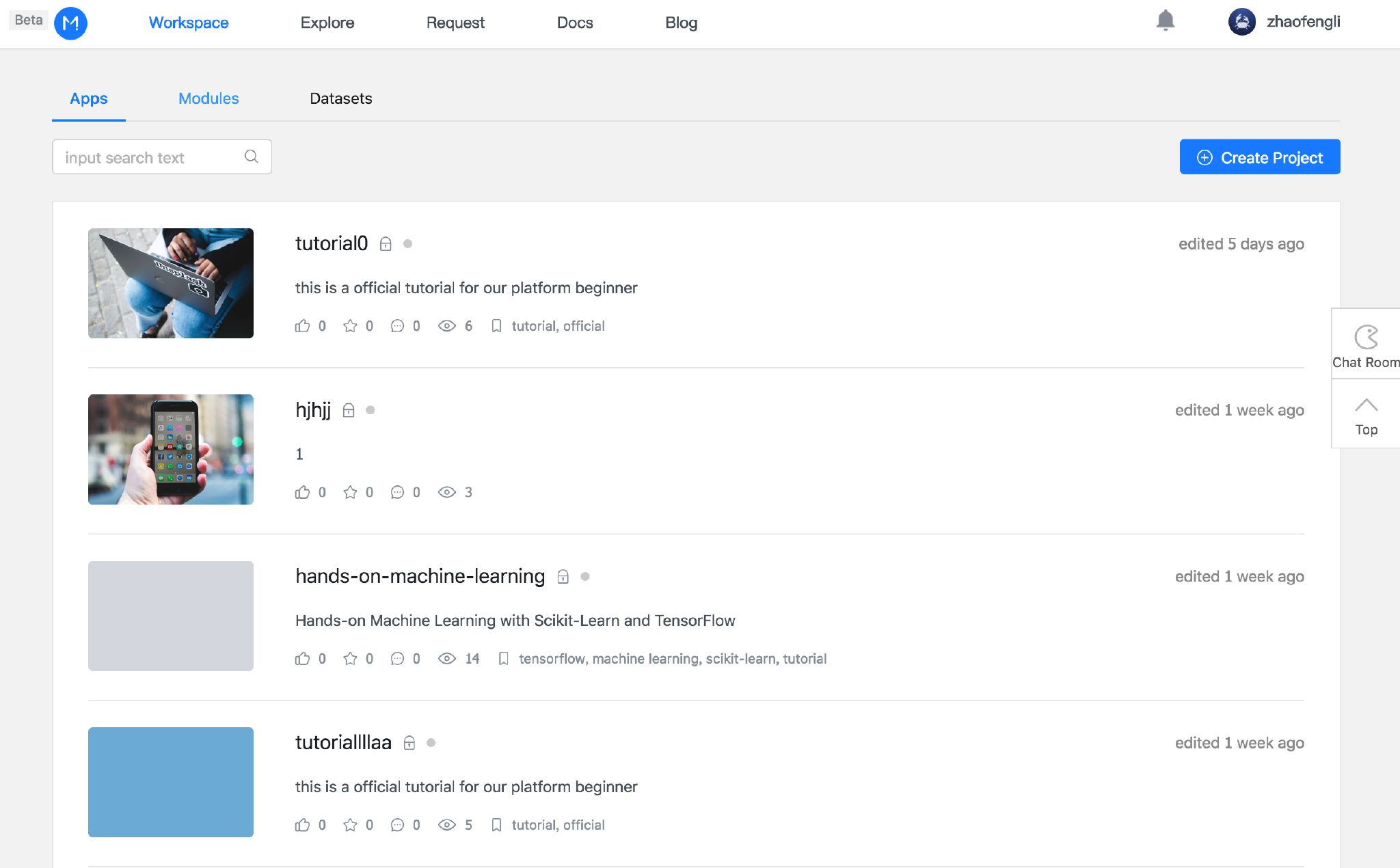
You can see all your working projects in “Workspace”, also including the number of the project being liked, watched and added to favorite. By click any one of the projects, you can see the detail information further. Before we get deeper into IDE, let’s give you a brief concepts of three project types in Mo.
Project is the basic working unit in “Workspace”. In Mo, there are three types of projects:
- “App” project - An app is a software program which is designed to perform a specific function directly for the user. If you have a fancy idea, you need an app to realize it.
- “Module” project - Modules are developer-oriented software components which make up apps. Our platform have two categories of modules: models and toolkits. Models can be trained while toolkits cannot.
- “Dataset” project - A dataset is a collection of data. When you are developing modules, you need dataset to train them. MNIST, IRIS, SCADI are famous datasets for machine learning.
Dataset Project
Data is the material of produing ML model. In ML, we need train the model by as larger amout of data as possible. You can upload data to your dataset project. With well-descripted overview of the dataset proejct, other developers can understand your data and try to build some useful models with it.
We also provide data labeling crowdsourcing for the dataset projects. Everyone in Mo can participate the labeling tasks of the dataset projects to help train ML model. Do you have some data but don’t know how to utilise it? Try upload it to Mo and let’s see what will happpen!
Module Project
Module is the logical operation unit in the ML based application. We divide it into two categories: 1) Model, and 2) Toolkit.
- Model - A model with user-defined intput/output and provides predict()/train() function. Developers can import the model directly and use it with initial weight, or re-train the model with other data sets.
- Toolkit - A toolkit is just like a function, it’s not trainable.
So you can develop a ML model by creating a module project, or you can package your model into a toolkit which cannot be re-trained. Both of them must have clear definition of intput and output, so that other developers can use it follow the instructions. You can publish your models/toolkis for other developers to use.
App Project
App is composed by multiple modules with some glue codes toward the particular purpose. You can import other pre-trained models and some useful toolkits together within your App project to develop the solution to fulfil your requirement.
You can also deploy your App project in Mo directly and to test it in our “Example” tab of App project. Once you have deployed the App project, we will package your deployed App as a RESTful API to let you embed into your own application for further usage.
Notebook - Your Coding Playground
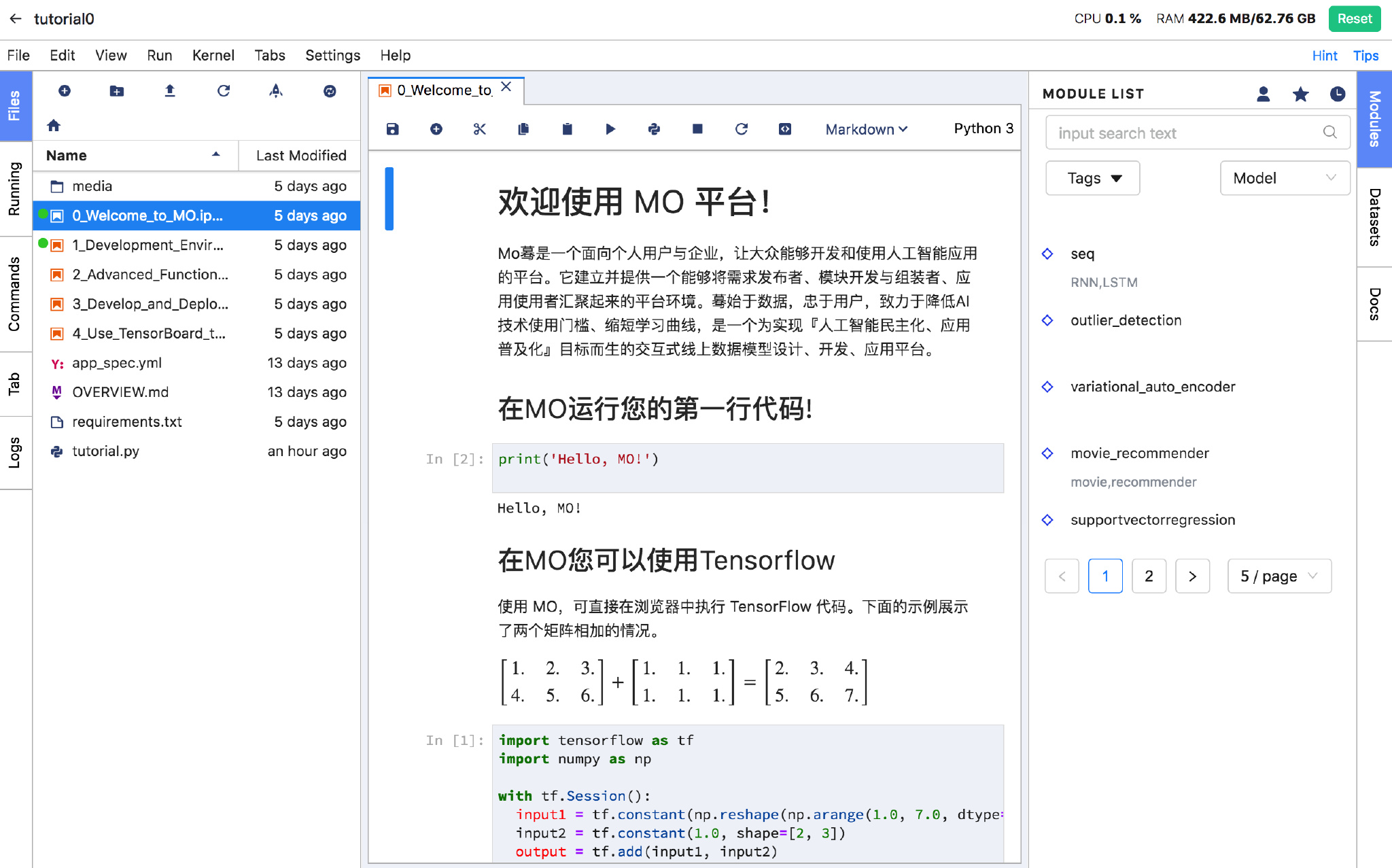
When you click “Go Coding” button withing a project, you will start the Notebook - your coding playground in Mo. Whether it’s Dataset/Module/App project, you can all get into the Notebook with it.
The central part of the Notebook is the main working area, the new opened file will show in tab form here. By creating a notebook files (*.ipynb), you can start to write codes in it. Moreover, You can execute your codes cell by cell in the notebook and without any installation on your local machine. For further notebook coding tutorial, please go visit our doc.
On the left-hand side of the IDE, you can see a window of:
- “Files” - A file list view of current working folder.
- “Running” - List all running processes in sessions.
- “Commnad” - A list of shortcut commnads.
- “Tab” - A list of open tabs in main working space.
- “Logs” - A list of logs.
On the right-hand side of IDE, you might see a window of:
- “Modules” - A list of published modules which can be imported
- “Datasets” - A list of published dataset which can be imported
- “Docs” - A document browswer which help you to find some useful information about coding.